How to Make Old GIFs Look Smooth (60fps Guide)
2026-08-08 · 6 min read · By the GIFtoVideoAI team
Old GIFs have a tell: they stutter. Characters move in visible steps, camera pans jump, and scrolling text crawls. The clip isn't broken
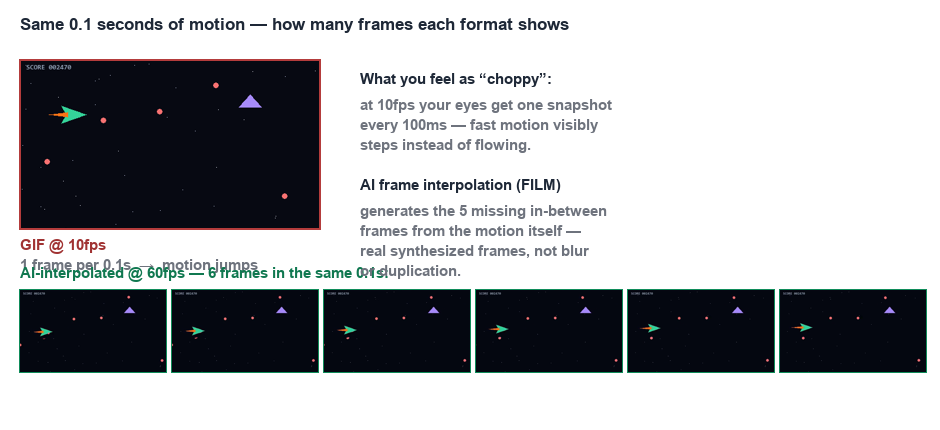
!What interpolation actually adds — same 0.1s window, 1 source frame vs 6 interpolated frames — it's just starved of frames. Here's why, and what actually fixes it.
Why old GIFs are choppy
Three compounding reasons:
1. Low capture rate — 90s/2000s GIFs were often digitized at 8–12fps to keep file sizes under early bandwidth limits (a 56k modem could not deliver 30fps)
2. Uneven timing — GIF stores per-frame delays in 10ms units, and many encoders rounded badly, producing rhythm errors you feel as jitter
3. Deleted frames — to squeeze under size caps, creators dropped every other frame before publishing
You can't recover frames that were deleted — unless you synthesize them.
Frame interpolation: inventing the missing frames
Modern AI models (like FILM from Google Research, which powers our 60fps converter) analyze motion between two existing frames and generate the in-between frame:
- Frame 1 shows a hand at position A
- Frame 2 shows it at position B
- The model predicts where it would be at the halfway point, pixel by pixel
Do this between every pair of frames and a 10fps GIF becomes a 20fps video; combined with frame doubling you reach a smooth 60fps. On simple motion (slides, pans, talking heads) results are visually flawless. On extreme motion or scene cuts, artifacts can appear — good pipelines detect cuts and skip them.
Step by step
1. Dig up the GIF (Giphy, old forums, your 2009 hard drive)
2. Convert it to MP4 first if needed — convert here, it runs in your browser
3. Run it through AI frame interpolation to reach 60fps
4. Optionally upscale 2× in the same pass — old GIFs are often 200px tall, which looks rough on modern retina screens
When interpolation won't help
- Static loops (blinking icons, sparkles) — already smooth, just short
- Frame rate is fine but compression artifacts remain — that's a quality problem, try lossless conversion
- The source is 5fps with extreme motion — too few reference frames for reliable synthesis
For everything else, 10fps-to-60fps is the single biggest visual upgrade you can give a vintage GIF.