Why Does My GIF Look Choppy? Frame Rate Explained
2026-08-15 · 5 min read · By the GIFtoVideoAI team
"My GIF plays fine in my editor but stutters on the website." Sound familiar? GIF playback smoothness depends on more than fps — and the fix depends on correctly diagnosing the cause.
Cause 1: Genuinely low frame rate
Most GIFs run at 10–15fps. Cinema is 24fps, video is 30–60fps. Below ~15fps, the brain stops blending motion into fluidity and starts seeing discrete steps. Check the frame count and duration: 30 frames over 3 seconds = 10fps, and no player will make that look smooth.
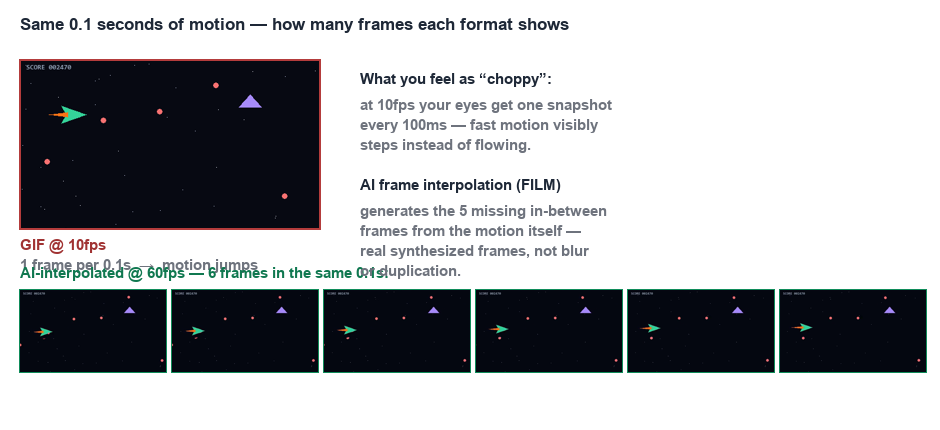
Fix: AI frame interpolation synthesizes the missing frames.
!Same tenth of a second, counted from real outputs: the 10fps source holds 1 frame, the AI-interpolated 60fps holds 6 Our 60fps tool turns 10fps sources into fluid 60fps video.
Cause 2: Frame delay rounding
GIF stores each frame's delay in units of 10ms. A 60fps animation needs 16.67ms delays — impossible to express. Encoders round to 10 or 20ms, so frames display for the wrong durations. Worse, many old tools wrote "0ms" delays, forcing browsers to guess (usually assuming 100ms → sudden slowness).
Symptom: the GIF plays at the *wrong speed* or with irregular rhythm rather than low fps.
Fix: convert to a video format with precise per-frame timestamps. MP4 conversion normalizes timing to a clean constant frame rate.
Cause 3: Browser throttling
Browsers deprioritize or slow GIF decoding when:
- The GIF is off-screen or the tab is backgrounded (resumes fast-forwarded)
- Battery saver is on
- Many large GIFs play simultaneously (memory pressure)
- The GIF is huge — a 50 MB GIF makes the decoder hitch while downloading more frames
Symptom: plays fine locally in an image viewer, stutters embedded on a page.
Fix: serve video instead. A "video autoplay loop muted playsinline" element gets hardware decoding and smooth playback where GIFs choke — see GIF to WebM for the most web-efficient option.
Diagnosis flowchart
1. Plays wrong speed or irregularly? → delay rounding → convert to MP4
2. Correct speed but visibly low fps? → true frame rate → interpolate to 60fps
3. Fine in viewers, bad on the web? → browser throttling → switch to video element
In all three cases the destination is the same: video formats. Convert first with our free browser converter — then decide whether the result needs interpolation or upscaling.